Tech, Tips, and Tutorials.
Reviews, News, and Rants.

Showing posts with label web service. Show all posts

140it reduces your Tweets to 140 characters

Continuing with the Twitter coverage, new service 140it promises to compress your tweets to squeeze them in the 140-character limit default in Twitter.

Let’s see how they convert the above paragraph, which is 11 characters over the limit:

Continuing wth the Twitter cvrg, new srvc 140it prmss 2 compress your tweets 2 squeeze them in the 140-character limit default in Twitter

140it did a great job, getting it to 3 characters less than the limit. The service is useful if you frequently extend the limit set by Twitter. It also will shorten URLs (using bit.ly) as part of the tweet shortening process – a handy tool.

There are other tweet shortening tools, but they all required you to visit their website. Often you either forget or find out it’s faster to do this by hand. 140it is available as a bookmarklet, which means that you can simply drag it to your toolbar and click it to do its work there and then.

Here’s the demo:


140it Demo from Vinicius Vacanti on Vimeo.

[140it – via TechCrunch]

Continue Reading

iTweet: Twitter on steroids

iTweet iTweet is a web-based client for the popular micro-blogging service Twitter. The service was built by avid Twitter user colbypalmer. So what makes iTweet so special compared to the dozens of Twitter clients already out there?

Well, for one thing, it's web based - meaning all you need to run it is a tab in a browser. Despite the default Twitter client also being web-based, iTweet one-ups it in many ways. It has super-useful features built in, such as: url-shortening via bit.ly, native and automated re-tweeting, auto-refresh, main-page searching, unicode symbol support, and support for hashtags, and much more.

It copies the basic layout of the main Twitter site, but with obvious provisions for the added features. The site has a utilitarian look that definitely has its draw (you can change it to your default Twitter colours).

itweet screenshot

The interface is heavy in its API usage and you can run down to your limit of 100 requests per hour really quickly. However the client has options to cater for this.

All in all, iTweet is a comprehensive Twitter client that can fully replace the default web interface.

[iTweet]

Continue Reading

How good is your Colour Knowledge?

Colour specialists x-rite have created a fun little test to assess how good you are at colour hues. You are given four rows with little colour boxes on them. You need to re-arrange the boxes to get a consistent flow from one hue to another. It’s easier to see this than it is to explain it, so go ahead and take the test.

The test then asks you for your age group and gender so it can compare you score to similar demographic groups. The score is a simple scale from 0 to 1000. Getting a zero means a perfect score, and anything between 0-99 is classified as good (high colour IQ). I got a 4, so I’m pretty chuffed at the good result!

(P.S. It’s filed under photography because I think it’s a good idea that a photographer has a good, working colour knowledge)

Continue Reading

Facebook interface: Good, but not good enough

Image: Facebook logoNote: This article is outdated, it was written before the big Facebook overhaul. Still, some points remain valid today...

Much as I enjoy the many novel features Facebook enjoys over other social networking sites, I don't appreciate its interface at all. Despite it having a user interface quite a bit better than its rivals, it still isn't good enough. Here are two of my biggest gripes…

Notifications shouldn’t be this painful

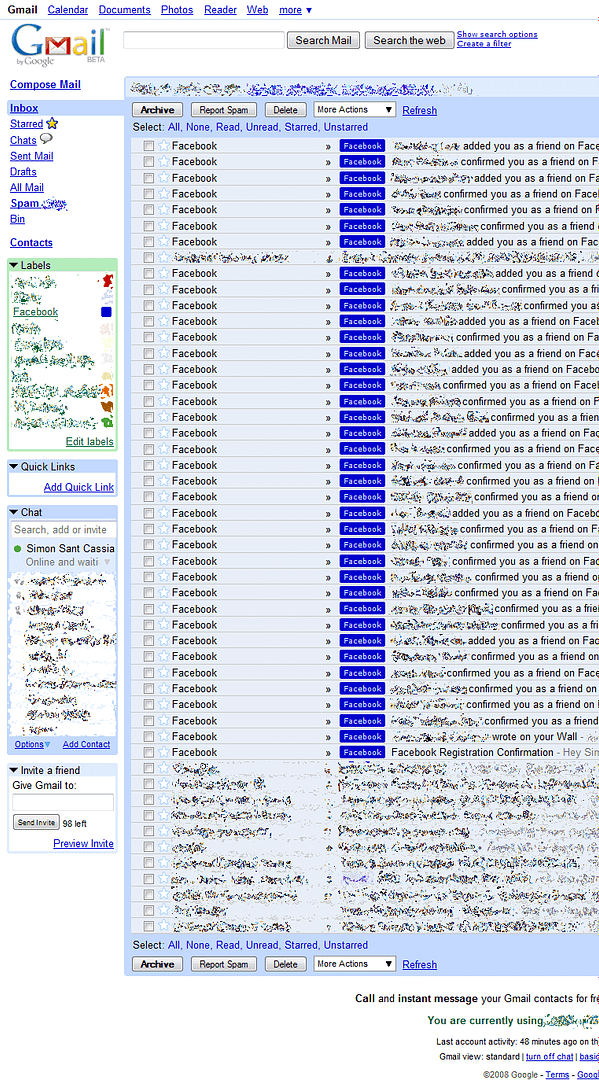
My biggest complaint is actually related to the way it handles email notifications by default. It will typically send you every notification it possibly could, immediately after it happens. This is what my gmail inbox looked like after 24 hours of joining: (click to zoom in)

At least, there is an easy way to at least reduce the amount of emails Facebook sends you. Click on the “Account” link on the top-right, and then go to the “Notifications” tab. Alternatively, here’s a direct link if you’re already signed in. You’ll find a list of options that enable you to easily reduce the level of clog in your inbox. Think about removing notifications for new friend additions.

Adding friends & the login barrier - why so many hoops?

When adding new friends, for example from the “People you may know” section, it’s reasonable to assume that before adding someone, you’d want to make sure it’s the right person. You’d want to look at their photos, etc. Sadly you need to be their friend to do these things.

I can understand why Facebook would want to stop users from visiting non-friend profiles; stopping spam, etc. However couldn’t they have implemented a privilege system, where only friends could view and comment on walls and see private contact info, but photos and a bio was accessible to everyone? (turns out they have - it's optional) I was extremely frustrated when a friend sent me a link to view their photos, but I was confronted with a login barrier. Since I didn’t have an account, I couldn’t do anything but turn back.

Room for improvement, but still pretty good

The heading pretty much sums up my experiences so far with Facebook. Did I mention how much I love the apps feature?

Continue Reading

SplashUp Review: the future of picture editing?

Go to SplashUp now

Previously known as "Fauxto", SplashUp can (in a nutshell) be defined as a Flash-based, browser-integrated image-editor. It's one of the better ones out there and can be almost be called "Photoshop Lite".

During the recent times, a lot of web-based image-editing programs have been sprouting up. And why not? Web-based solution don't need any additional software to run.

SplashUp offers you the option to open an image from 6 different places. You may open a from some photo-sharing sites (such as Flickr), locally, or else by providing the photo's URL. However I wasn't able to open an image directly from Flickr, SplashUp just kept on giving me error messages. Using a photo's URL works fine though.

SplashUp is the only online photo-editor I know of which supports:
- Layers. Plus: blending modes, advanced layer effects, and opacity changes.
- The ability to open multiple images at the same time.
- A windowed environment, made possible by Flash.
- The creation of images from scratch.

It also offers pixel-level editing, using a variety of brushes and gradients. It also has some pretty advanced text control.

Much like all free services, this program isn't without its flaws/bugs. For one thing, it is missing a couple of major features. One feature missing is keyboard shortcuts. Keyboard shortcuts help streamline your workflow, they save time and mouse clicks. Everyone knows that CTRL+Z is an undo, why they didn't implement these in SplashUp is anybody's guess.

Another feature which is amiss is probably a limitation of Flash itself. SplashUp is missing the context-sensitive right-click menu. When you right-click in Photoshop, you get a menu that's relevant to the tool selected, such as settings for the brush tool. SplashUp sadly misses this useful feature. Flash probably needs this menu for itself. Being totally implemented in Flash, it has to accept the limitations that its programming language has.

Its largest fault however, is that it's buggy, and quite unstable. Specifically, after a while of using it, it tends to crash very often, requiring a restart. Given time, I'll bet that the developers can iron out the bugs. Lastly, the sharpening option sucks big time. There is a workaround - duplicate the layer, apply the 'Sharpen' filter, and reduce the opacity. But who likes workarounds?

Conclusion

SplashUp is a fantastic achievement. It's speedy, resource-light, and offers a vast array of tools and advanced controls that many paid-for programs don't even offer. It wouldn't be unfair to call it a 'lite' version of Adobe Photoshop.

Of course, SplashUp has it's share of negatives, of which there are many. The main one for me was that it's rather buggy and unstable. I hope that future versions will improve on this aspect (there are sections for bug reporting and feature requests, by the way).

Because all you need is a web browser and a Flash player, it can be run from most computers. This makes it great for a quick edit to a photo of yours (even for example adding a watermark), wherever you are.

Highly Recommended (with reservations)

Go to SplashUp now!

Continue Reading