Tech, Tips, and Tutorials.
Reviews, News, and Rants.

Showing posts with label info. Show all posts

Easter Eggs in MS Word

Apparently, Microsoft Office Word is full of Easter Eggs (an "Easter Egg" is a small, undocumented procedure in a program that normally expresses interesting commentaries or gives credit to the people who labored over the program. Like their namesake, Easter Eggs normally take a while to find and can be quite elusive. )

Perhaps the most famous is the "rand" trick. Open up a new Office Word document and type the following exactly as it appears below, then press enter.

=rand(x, y)

Where 'x' is the number of paragraphs and 'y' is the number of sentences.

In the case of Office Word 2007 enter =rand.old(x, y) to get the same effect.

This will then display the pangram for x paragraphs and y sentences (The quick brown fox jumps over the lazy dog). A pangram is a sentence that contains all the letter in the alphabet. It's used for displaying fonts, etc.

More pangrams

  • =lorem() or =lorem(x, y) -- which will do the same thing but instead for Lorem Ipsum text.
  • =rand() or =rand(x, y) (only in Office Word 2007) -- displays some boilerplate text about the insert tab.
Continue Reading

Asus Eee PC: Overview

Eee PC front In June 2007, Asus released the revolutionary new Eee PC. Originally intended as an ideal first computer for elderly citizens and children alike, the Eee PC has instead proved very popular among power users of Linux and a few business users.

What is it exactly?

The Eee PC stands for Easy to learn, Easy to work, Easy to play. Realising that most people use laptops for internet-based applications such as Web Browsing, Emailing, Instant Messaging, etc, Asus built this machine around those kinds of requirements. It is touted to offer Complete Mobile Internet Enjoyment.

Why is it so 'Revolutionary'?

The Eee PC is a great little piece of kit.

By little, I actually meant tiny. The sub-notebook (?) is not much larger than a hardcover book, and much smaller than conventionally sized laptops. The keyboard is also said to be fairly decent, despite the smaller size. The same can be said for the trackpad.

Weighing in at just 920g and running a 900MHz Intel Celeron Processor with (typically) 512MB worth of RAM, this laptop ought to cost more than what is being asked for it.

It's cheaper than some mobiles and much cheaper than anything in its class. It isn't meant to compete with bargain notebooks, although it will inevitably be compared to one due to its low price.

How good is it for a Photographer?

For digital photographers who have been searching for an ultra-portable solution to back up their data on the go. It's especially suited to the travelling photographer who needs the small size. However, there are a few drawbacks, especially for a photographer.

Drawbacks

  • 7-inch screen not great for extended photo viewing & editing — 800x480 resolution not perfectly ideal, but still seems to be serviceable.
  • Limited hard drive space — because of the nature of solid-state memory, the Eee PC typically comes packed with just 4GB worth of internal memory. At least it's easy to overcome this with cheap external solutions.
  • Slightly cramped keyboard & trackpad — but not too bad according to reports.
  • Most significantly, it doesn't come with Windows XP pre-installed. Instead, it is running a custom version of the Linux OS. This keeps the price down since Linux is free. It is possible to install Windows XP though, and the Eee PC even comes with instructions on how to do it.

Recommendations

If you're looking for an ultra-portable laptop that still offers decent usability and is pleasant and fun to use, almost certainly get the Eee PC. If you really demand a lot of power from your computer and rely on Windows software, then consider a pass. However there are thousands of alternatives to the Windows software. Open Office is pre-installed, for example (replacing MS Office).

It's a seriously compelling device.

  • Suitable for: People who need it uber compact and lightweight, and have only basic needs (email, internet, document work, photo/video viewing, etc). Also for photographers looking for this kind of portability.
  • NOT suitable for: Demanding users, gamers, and people who rely heavily on Windows-only software (although thousands of free Linux-based alternatives exist).

Find out more

Additional images

(All pictures open links in a new window to their originating website)

from pcpro.co.uk from directron.com from trustedreviews.com

    Continue Reading

    Primes vs. Zooms

    3 Lenses

    Do you prefer to get the right focal length with a zoom, or do you think in one format like a prime? Everyone's different. I'm a prime person, but I also appreciate a good zoom when I see one.

    Last Updated: 18 Feb 08 (v3)

    What's a prime?

    A lens with only one focal length. This means that it will not be able to zoom in and out, i.e. your shooting is limited, to a certain extent. Also known as fixed-focals.

    So what should you buy? A prime or a zoom? Well first you need to know what's your preference.

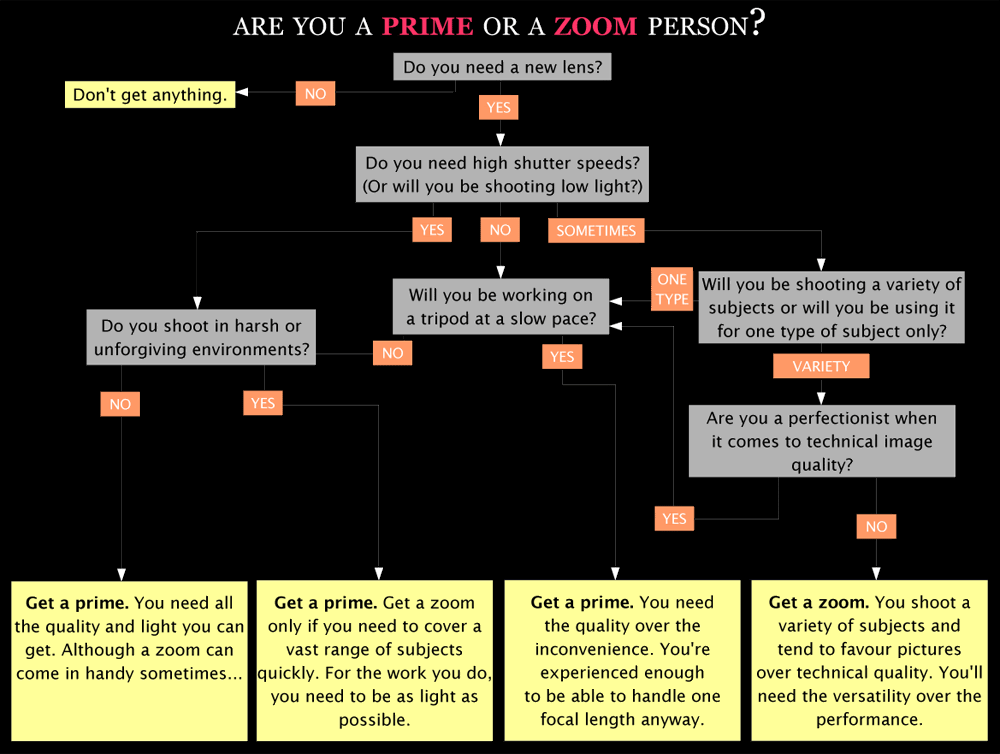
    Take the test to find out

    I've written a mini questionnaire that will hopefully get you closer to an answer. Taking it will help you find out which kind of person you are. Take your time, and think about each question and how it applies to you. If need be re-take it to see if you arrive to the same answer.

    2 ways to download the test:
    You can download and take the test in either GIF or PDF format. I recommend the PDF version.

    Download links

    • GIF version
    • PDF version (link 1) (link 2)
      (note: try the first link, if it doesn't work then try the second link)
      Test Preview


      Below are advantages of going with primes or zooms. In the end it's your choice as to which you prefer.

      Advantages of primes

      - Smaller and lighter than equivalent zooms, with all other factors being equal. This is because you don't need a lot of glass to build primes. E.g. a 400mm f/5.6 prime is much lighter than a 200-400 f/5.6 zoom.

      - Primes are much sharper, especially wide open and at the corners. Because of their simpler optical formula, these lenses perform much better than zooms wide open. A zoom lens needs stopping down to get acceptable quality. You won't gain too much sharpness by stopping down a prime.

      - Almost always faster. This is probably the most appealing point. This allows more background blur and higher shutter speeds (or lower ISOs). In order to get their EF 70-200 f/2.8 IS to match their EF 200 f/2 IS, Canon would need to make it 2x the size and 2x the cost of the current version, and it STILL wouldn't be as sharp. This is simple maths.

      Advantages of zooms

      - More convenient and versatile. This is the biggest reason why zooms are more popular. People care more about being able to set a precise focal length. They don't like being limited to one focal length

      - Fewer lenses needed to cover the same focal lengths (however each one is larger, heavier, and less sharp).

      And another thing...

      I personally prefer primes for the normal range, around 18-150mm. They're more portable and offer better quality. However I like the convenience that my 18-55 offers, provided I'm willing to live with the compromises involved.

      One last point, primes have their own "character". Because of the fact that they have a simpler optical design, primes can get their own optical character. My Nikkor 50mm f/1.4 AI-S (look out for an upcoming review) has a slightly warm touch to its images and a crispness to its images. This crispness stems from the fact that the few glass elements used in the construction allow for higher image contrast. Zooms have a lot of glass inside them. When light enters the lens it will have more pieces of glass to bounce against, thus inevitably reducing contrast.

      Further reading

    Continue Reading

    Nikon digital SLR family

    Last Updated: 17 Jan 08 (v2)

    Nikon have a total of 6 digital SLRs in production today.


    Consumer


  • Nikon D40
    6 MP DX sensor (announced November 2006)

    Nikon's lowest-end digital SLR. Aimed at either the absolute beginner; those moving up from a point-and-shoot; or those looking for a low-cost gateway to the Nikon system. Famous for: price and image quality. Infamous for: supporting auto focus only on AF-S/AF-I lenses. Having 'only' 6 megapixels. The Nikon D40 replaced the Nikon D50.

  • Nikon D40x
    10 MP DX sensor (announced March 2007)

    A 'big-brother' to the Nikon D40. The biggest difference is that this has 10 megapixels (4 more over the D40). It is primarily intended to provide competition to the Canon EOS 400D in the crowded 10 MP entry-level market. Famous for: Having the same image quality as the excellent D40. Infamous for: auto focus with AF-S/AF-I lenses only. The Nikon D40x has no predecessor. It doesn't replace the Nikon D40 or D50.

  • Nikon D80
    10 MP DX sensor (announced August 2006)

    Nikon's feature-full intermediate camera. Priced above the D40/x line and offers more features, including autofocus with older AF lenses. Famous for: Image quality, features. Infamous for: Often flawed Matrix Metering. The Nikon D80 replaces the Nikon D70s.


    Professional


  • Nikon D200
    10 MP DX sensor (announced November 2005)

    Offering a robust magnesium body and superb ergonomics in a compact body, the Nikon D200 is a camera mainly aimed at professionals looking for a backup body, and amateurs/enthusiasts looking for premium performance. Famous for: build quality, features, performance. Infamous for: Noisy high ISO. The Nikon D200 was a huge upgrade over the aged Nikon D100. Note: the new D300 has NOT replaced the D200. D200's are still being produced today.

  • Nikon D300
    12 MP DX sensor (announced August 2007)

    The Nikon D300 is a semi-professional camera. It has a lot in common with the much larger, professional level D3. Its main features are: a weather-sealed magnesium body; 6 fps (expandable to 8 fps with battery grip); 14-bit image processing (shared with D3); professional 51-point AF (shared with D3); 922k-pixel 3" LCD screen (shared with D3); Live View with Contrast-Detect AF (shared with D3); and a dust shaker. Famous for: professional features, value for money. Infamous for: Some early adopters are reporting faulty metering, these were replaced under warranty. The Nikon D300 doesn't replace the D200 according to Nikon literature.


  • Nikon D3
    12 MP FX sensor (announced August 2007)

    The Nikon D3 is a professional camera. It offers plenty of professional-level features and many firsts for Nikon. Most notably, it is the first Nikon to have a full-frame 35mm sensor (coined FX-format). It offers: an unprecedented 9 fps; 51-point advanced AF system; 14-bit image processing; 5.1 MP DX crop mode; 922k-pixel 3" LCD screen; Live View with Contrast-Detect AF; and a robust, fully weather-sealed body. Famous for: FX format sensor, image quality sets new standards. Infamous for: Nothing, except that the high price tag puts it out of the reach of many. The Nikon D3 seems to have replaced the D2Hs. But because it has no 'H' suffix, it is suggested that it also replaced the D2Xs. However, rumours of a high-resolution D3X have been circulating for months.

  • Continue Reading

    Why I didn't go for the Nikon D40x

    No image? Click here to attempt opening it in a new window The Nikon D40x was a camera that was released four months after the original D40. It was built so that those that felt that they need more than 6 MP will have the camera they want. It is priced to be in direct competition with Canon's EOS 400D. It wasn't intended to be a replacement model, just a “big brother” version of the D40.
    Note: This isn't an article written to justify my purchase. Read the post's title. It's an article about why I didn't buy the D40x instead.

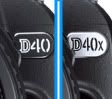
    Besides a few internal differences, the D40x is identical to the D40. It uses the exact same body, the same screen, the same menus and interface, and all the things which made the D40 such a great camera. In fact the only external difference is the badge.

    Below are the most significant differences between the two: - 10 megapixel CCD sensor (D40 has 6 MP)
    - 3fps (D40 shoots at 2.5fps)
    - Lowest ISO of 100 (D40's lowest is ISO 200)
    - Lm100 (€235 or £160) more expensive
    - Flash x-sync: The D40 is one of the few dSLRs that can sync the flash right up to 1/500. The D40x, D80 and higher can only sync up to 1/200.
    - Slightly noisier shutter. Above 1/100 the D40 uses a silent electronic shutter, while the D40x uses a mechanical shutter right till 1/4000. This is the reason for the D40's higher x-sync speed.

    One of the reasons that I like the Nikon D40 is because it has a relatively low pixel count. More megapixels mean worse image quality, given the same sensor size and tech. Anyway, 4 more MP isn't that big a deal. While 10 MP sounds like almost double 6 MP, in fact it isn't. It is only a 22% increase. In order to double the resolution of 6 MP, you would need a 24 MP camera.

    Having more MP is a good idea if you plan on making huge prints and viewing them with your nose touching the print. 6 MP is more than enough to print beautifully up to A3 size, and even A2 with some work. Who prints that big anyway? Not the average D40(x) user anyway.

    Shooting at 3 fps compared to 2.5 fps is a non-issue. 0.5fps will not make a big difference. Get yourself a 9/11fps Nikon D3 if you're serious about continuous shooting(RRP Lm5,000).

    Going down to ISO 100 would have been very important if it was a compact camera (they suck at anything above ISO 100), but the D40's ISO performance is so good, you won't miss ISO 100.

    All in all, the D40x just wasn't worth the Lm100 premium for me.

    Continue Reading

    Sony N1: Overview

    I have a Sony N1, and have published an extensive review.

    Go to the review now

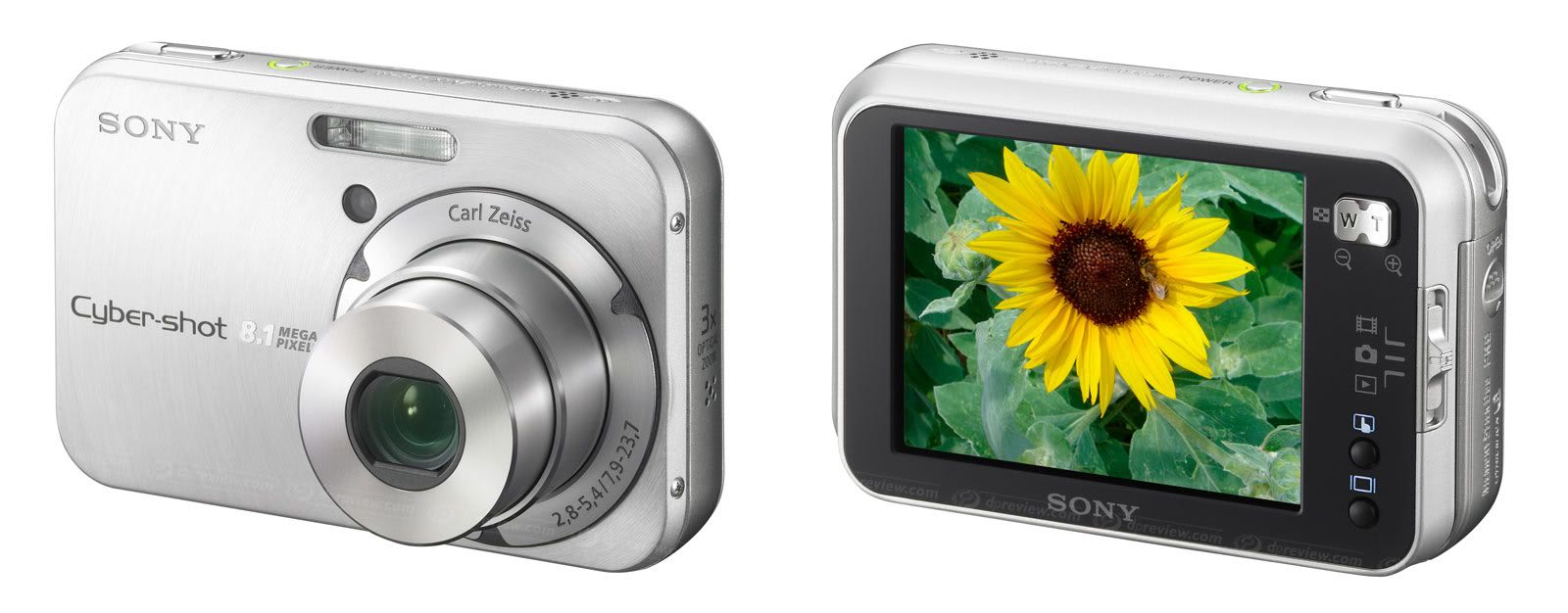
    The Sony Cyber-shot DSC-N1 has been replaced by the 10-megapixel N2. Besides the megapixel difference, the two cameras are almost identical. The N1 is still a good camera, and should still be available in some stores.

    No image? Click here

    Back in October 2005, Sony announced a new range a ultra-compact digital cameras: the N-series. Their first model was the compact and unique 8 megapixel Cyber-shot DSC-N1. It has a rather high price tag, and so the camera was aimed mostly above budget-level, for non-photographers who want great pictures and be able to show them off with everyone. The N-series slots in nicely above the ultra-compact T-series yet below the bridge-type H-series cameras from Sony.

    This type of camera was designed with the consumer in mind. It has a large, bright, wide viewing angle, high resolution screen. Just perfect for showing off the pictures and movies you've taken.

    Who should buy a Sony N1?

    The camera is targeted towards casual snappers who are looking for a good looking, reliable camera for memories' sake. It isn't really designed to be used by a demanding photographer.

    However in my review, I concluded that the image quality and manual controls meant that the N1 can punch above its weight. I'd say you could use it for high resolution landscapes and other still subjects.

    Key Features

    - Large, high-resolution LCD. Sony's Clear Photo® LCD technology.
    - Touch screen operation.
    - 8.0 effective megapixel Super HAD™ CCD.
    - Carl Zeiss® Vario-Tessar 3x Lens.
    - ISO range from 64 to 800.
    - MPEG video recording at VGA (640x480) resolution at 30 fps.
    - Built-in album function allowing storing of up to 500 photos.
    - Slideshow with Music.

    Community

    You can view thousands of photos taken with the Sony Cyber-shot DSC-N1 on its camera page on Flickr. You can view all the photos I've taken with the Sony N1 in my Flickr portfolio. There is also a Sony DSC-N1 group on Flickr.

    There are some more photos taken by the Sony DSC-N1 at PBase.

    Reviews

    The N1 has a few major reviews.

    Click here to view an in-depth review of the Sony N1

  • DC Resource's Review (by Jeff Keller). Jeff's enjoyable tone takes you through an honest, balanced review.
  • megapixel.net's review. A detailed review full of product shots and example pictures. A little tedious to read through.
  • Yahoo! Shopping - User Reviews. The quality is obviously dubious, but it's still worth reading a few of the reviews (36 at the last count).
  • Continue Reading

    Nikon D40: Overview

    No image? Try clicking here

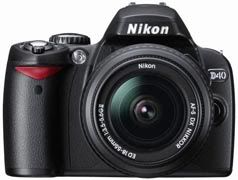
    The Nikon D40 is an entry-level digital SLR camera. It replaces the Nikon D50. It was announced in November 2006, after lots of speculation and leaks.

    Click here to read an in-depth review of the Nikon D40

    Who should buy a Nikon D40?

    The D40 is a camera primarily aimed towards beginners. It can "teach" its users about the innards of photography through interactive learning. Here's an excerpt from an article in Time magazine by Wilson Rothman:

    The D40 is a teacher. One of its most fascinating attributes is the Info screen, which appears at the touch of a button, appropriately marked "Info." The screen contains all sorts of data, mostly photographic mumbo jumbo. But the screen also has a visual representation of that mumbo jumbo, so you can figure out what it means. For instance, as the number next to the letter "F" goes up, the image of the camera's aperture gets tighter. It doesn't take long to sort out, then, that the higher the "f-stop," the more closed the camera's aperture. Beginners will appreciate the fact that the D40 has a knob of preset modes, not just my favourite "auto" mode but "portrait," "sports" and more. What's cool is that, when you change modes, the screen shows the changed settings. Little by little, the notions will start to sink in: what the camera is trying to do to shoot action, what it needs to take a portrait at night, etc.

    However, the D40 is versatile enough to serve more than just a beginner. If you're an amateur photographer on a budget, you'll find the D40's price extremely tempting.

    Don't think that the D40's "idiot" modes will get in the way, they don't. If you're already experienced enough to know the basics, then you'll be able to shoot in the more advanced P, A, S, M modes. While this camera is designed for beginners, it doesn't get in the way of the more advanced photographers.

    The D40 offers an incredible amount of camera for the money, and every penny seems well spent. Every now and then it makes the more expensive Nikon D80 look over-priced and under-powered.

    AF issue with Older Lenses

    The D40 will not be able to autofocus with lenses that don't have an in-built focus motor. Reason being that, it doesn't have its own “screwdrive” focus motor. A lot of older and third party lenses rely on the motor in the body to focus. Hence, they will not be able to AF on the D40. The only ones that are able to autofocus are Nikon's AF-S/AF-I type lenses, and Sigma's HSM type lenses.

    If you plan to use the autofocus feature of older lenses, then the D40 is not the camera for you. The newer lenses should all work perfectly however.

    Competition

    - Canon EOS 400D
    - Pentax K100D / K110D
    - Olympus E-410

    Main Features

    - 6 megapixel DX format CCD sensor (same used in Nikon D70 & D50, Pentax K100D)
    - Multi-CAM530 3-Area AF sensor
    - 3D Colour Matrix Metering II (420 pixel sensor) – for accurate exposures
    - ISO range from 200 to 1600, plus boost to HI-1 (approx. 3200)
    - Customisable Auto ISO
    - Up to 2.5 frames per second continuous shooting. Buffer: unlimited amount of JPEGs
    - 2.5", 230k pixel LCD monitor with high viewing angle
    - Monitor-based status screen – called the "Info" screen
    - In-camera Help Manual
    - In-camera Retouching Menu
    - Extensive list of Custom Functions, unusual in this price range
    - 0.8x magnification, 95% coverage viewfinder view
    - Small and compact, lightweight body
    - Value for money

    Reviews

    The Nikon D40 is a very popular camera, and has been reviewed by almost every major review station. Below are some links to the pick of the reviews..

    Click here to read an in-depth review of the Nikon D40

  • dpreview's Review (by Phil Askey). Probably the best review here. Technical, yet easy to understand. Extremely useful.
  • DC Resource's Review (by Jeff Keller). A nice conversational tone makes this one easy and enjoyable to read. Very informative.
  • Imaging Resource's Review (by Mike Pasini). A very exhaustive review. Goes into extreme technical detail. Supplied with loads of samples and a test gallery.
  • Review by Thom Hogan. Nikon expert Thom Hogan answers some technical user questions, and also provides thoroughly subjective observations on the camera.
  • Review by Ken Rockwell. Ken Rockwell's "opinionated, cranky style" is evident here. In this review, he avoids many technical aspects, in the sake of a simplistic review - but also makes some valid points about why he loves this camera so much.

  • Continue Reading