Tech, Tips, and Tutorials.
Reviews, News, and Rants.

Showing posts with label hardware. Show all posts

The Mouse Turns 40 Today

Happy Birthday to our humble little mouse. It’s hard to think that that little bit of hardware has been alive for forty years now.

Most hardware in use 40 years ago (keyboards excluded) has been completely phased out. Yet, despite it being so old, I can’t think of many more efficient, cost-effective, and accessible ways to access a computer.

We might soon have touch-screen computers and voice-commands – but I think the mouse is here to stay a good bit longer!

[The computer mouse turns 40 – via Macworld]
photo from funnyphotos.net.au

Continue Reading

The Power of the Optical Mouse

Image: The futuristic Starck MouseI'm continually frustrated by the trackpad on my Extensa laptop. It's not that it's a particularly bad trackpad, it's just frustrating.

Trackpads don't help at all when it comes to precise mouse selection. If you've ever tried to use Photoshop on a laptop you'd know what I mean.

Photo Credit

The optical mouse is a great tool for the modern laptop user. The great thing about them is you can use them on virtually any flat surface to a reasonable degree. They even work on bedsheets.

One thing about trackpads - dragging and dropping from one end of the screen to another is just so difficult to do. From a design perspective it's hard to make this any easier to do with a trackpad.

You can do everything you want to with a trackpad, but it just takes so much longer and is so much less satisfying to use than a simple optical mouse.

The mouse was designed to fit the palm and move a cursor in co-ordination with your hand. It wasn't intended to be a small, flat surface which only reacts to finger movement. Give use something substantial.

The point: for all you laptop users who haven't yet bought an external mouse, buy one right away. You don't need me to tell you. It's obvious! Get it optical too. No trackball cleaning to do and much more versatile. I don't care about wireless but you might. Free yourself from the shackles of the 2"-wide miserable bit of plastic you call your mouse.

Continue Reading

Asus Eee PC: Overview

Eee PC front In June 2007, Asus released the revolutionary new Eee PC. Originally intended as an ideal first computer for elderly citizens and children alike, the Eee PC has instead proved very popular among power users of Linux and a few business users.

What is it exactly?

The Eee PC stands for Easy to learn, Easy to work, Easy to play. Realising that most people use laptops for internet-based applications such as Web Browsing, Emailing, Instant Messaging, etc, Asus built this machine around those kinds of requirements. It is touted to offer Complete Mobile Internet Enjoyment.

Why is it so 'Revolutionary'?

The Eee PC is a great little piece of kit.

By little, I actually meant tiny. The sub-notebook (?) is not much larger than a hardcover book, and much smaller than conventionally sized laptops. The keyboard is also said to be fairly decent, despite the smaller size. The same can be said for the trackpad.

Weighing in at just 920g and running a 900MHz Intel Celeron Processor with (typically) 512MB worth of RAM, this laptop ought to cost more than what is being asked for it.

It's cheaper than some mobiles and much cheaper than anything in its class. It isn't meant to compete with bargain notebooks, although it will inevitably be compared to one due to its low price.

How good is it for a Photographer?

For digital photographers who have been searching for an ultra-portable solution to back up their data on the go. It's especially suited to the travelling photographer who needs the small size. However, there are a few drawbacks, especially for a photographer.

Drawbacks

  • 7-inch screen not great for extended photo viewing & editing — 800x480 resolution not perfectly ideal, but still seems to be serviceable.
  • Limited hard drive space — because of the nature of solid-state memory, the Eee PC typically comes packed with just 4GB worth of internal memory. At least it's easy to overcome this with cheap external solutions.
  • Slightly cramped keyboard & trackpad — but not too bad according to reports.
  • Most significantly, it doesn't come with Windows XP pre-installed. Instead, it is running a custom version of the Linux OS. This keeps the price down since Linux is free. It is possible to install Windows XP though, and the Eee PC even comes with instructions on how to do it.

Recommendations

If you're looking for an ultra-portable laptop that still offers decent usability and is pleasant and fun to use, almost certainly get the Eee PC. If you really demand a lot of power from your computer and rely on Windows software, then consider a pass. However there are thousands of alternatives to the Windows software. Open Office is pre-installed, for example (replacing MS Office).

It's a seriously compelling device.

  • Suitable for: People who need it uber compact and lightweight, and have only basic needs (email, internet, document work, photo/video viewing, etc). Also for photographers looking for this kind of portability.
  • NOT suitable for: Demanding users, gamers, and people who rely heavily on Windows-only software (although thousands of free Linux-based alternatives exist).

Find out more

Additional images

(All pictures open links in a new window to their originating website)

from pcpro.co.uk from directron.com from trustedreviews.com

    Continue Reading

    Primes vs. Zooms

    3 Lenses

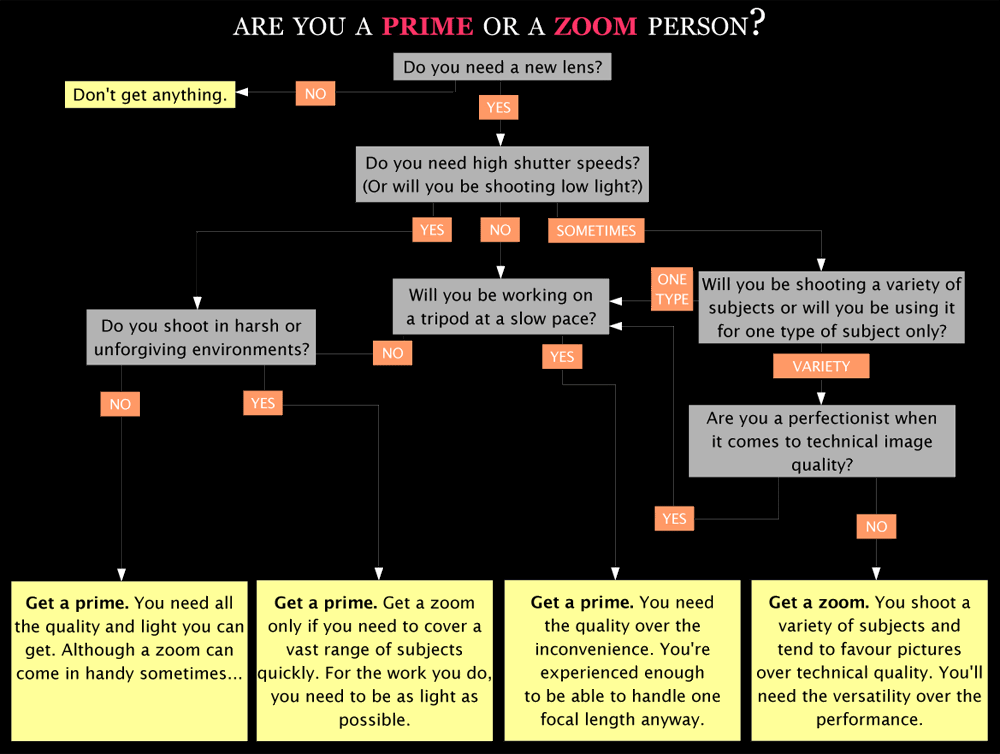
    Do you prefer to get the right focal length with a zoom, or do you think in one format like a prime? Everyone's different. I'm a prime person, but I also appreciate a good zoom when I see one.

    Last Updated: 18 Feb 08 (v3)

    What's a prime?

    A lens with only one focal length. This means that it will not be able to zoom in and out, i.e. your shooting is limited, to a certain extent. Also known as fixed-focals.

    So what should you buy? A prime or a zoom? Well first you need to know what's your preference.

    Take the test to find out

    I've written a mini questionnaire that will hopefully get you closer to an answer. Taking it will help you find out which kind of person you are. Take your time, and think about each question and how it applies to you. If need be re-take it to see if you arrive to the same answer.

    2 ways to download the test:
    You can download and take the test in either GIF or PDF format. I recommend the PDF version.

    Download links

    • GIF version
    • PDF version (link 1) (link 2)
      (note: try the first link, if it doesn't work then try the second link)
      Test Preview


      Below are advantages of going with primes or zooms. In the end it's your choice as to which you prefer.

      Advantages of primes

      - Smaller and lighter than equivalent zooms, with all other factors being equal. This is because you don't need a lot of glass to build primes. E.g. a 400mm f/5.6 prime is much lighter than a 200-400 f/5.6 zoom.

      - Primes are much sharper, especially wide open and at the corners. Because of their simpler optical formula, these lenses perform much better than zooms wide open. A zoom lens needs stopping down to get acceptable quality. You won't gain too much sharpness by stopping down a prime.

      - Almost always faster. This is probably the most appealing point. This allows more background blur and higher shutter speeds (or lower ISOs). In order to get their EF 70-200 f/2.8 IS to match their EF 200 f/2 IS, Canon would need to make it 2x the size and 2x the cost of the current version, and it STILL wouldn't be as sharp. This is simple maths.

      Advantages of zooms

      - More convenient and versatile. This is the biggest reason why zooms are more popular. People care more about being able to set a precise focal length. They don't like being limited to one focal length

      - Fewer lenses needed to cover the same focal lengths (however each one is larger, heavier, and less sharp).

      And another thing...

      I personally prefer primes for the normal range, around 18-150mm. They're more portable and offer better quality. However I like the convenience that my 18-55 offers, provided I'm willing to live with the compromises involved.

      One last point, primes have their own "character". Because of the fact that they have a simpler optical design, primes can get their own optical character. My Nikkor 50mm f/1.4 AI-S (look out for an upcoming review) has a slightly warm touch to its images and a crispness to its images. This crispness stems from the fact that the few glass elements used in the construction allow for higher image contrast. Zooms have a lot of glass inside them. When light enters the lens it will have more pieces of glass to bounce against, thus inevitably reducing contrast.

      Further reading

    Continue Reading