After recently purchasing a 16GB first-generation iPod Touch, I finally got round to publishing a detailed review (and screenshot tour).
The iPod Touch is widely regarded as being the “little brother” to the iPhone. Indeed, it’s similar in many ways to the iPhone. For one thing, they look almost identical – bar a few small (yet important) differences. AppleInsider has some great comparison photos between the iPod Touch and the iPhone.
Out of the box
After the first sync, the Touch was reporting firmware version 1.1.4. Version 2.0 was a paid ($9.95) upgrade. After connecting to iTunes, the first sync, charge, software update (to v1.1.5) took around 3 hours.
With v1.1.5, the iPod Touch comes with only a few of the default iPhone applications, including: Safari, the YouTube app, Calendar, a separate Contacts app, Clock, Calculator, the iTunes mini-store, and of course the iPod part (separated into music, videos, and photos).
Physically speaking
The iPod Touch has slightly different proportions to the iPhone. First off, at just 8mm, it’s considerably thinner than the iPhone (at 11.5mm). It also has a sharper matte black edge. The black rim actually makes the iPod better for viewing media on than the chromed iPhone. The back covers the battery, and you will need to get the battery replaced by Apple. It is of the typical iPod stainless steel that scratches up j so easily you’ll be cursing within a few hours at how the first wave of scratches got there.
The bottom holds the 30-pin connector slot and a standard 3.5mm stereo headphone jack. There are no volume buttons on the side, but you can use a quick double-tap of the home screen to change volume – from any mode, including sleep.
Build quality
Build quality is, typically excellent. There are no creaks when you squeeze the unit, and don't expect scratches on the front panel, which is made of glass and not plastic.
 Music: perfect
The music side of the Touch is very good – delivering some really good quality and using the great panoramic screen to full effect. It’s all very easy to use, and with Coverflow just a rotation away, we all knew the music app is pretty much perfect.
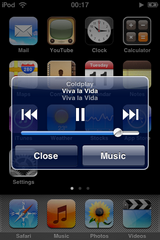
The music player can be controlled from just about anywhere in the iPod’s interface. Just double-tap the home screen to bring up a small dialog box. So far, the only screen I found where this doesn’t work is in Coverflow. See an example here.
Seeing the huge album artwork is always a treat – provided you actually bother to add the artwork in iTunes.
Coverflow also looks absolutely splendid, again thanks to the amazing screen.
Photos, Videos, and Safari: as expected
The photos app works just like the iPhone’s, except for the sending capabilities. The stretching and pinching actions will zoom in and out respectively, while photos can be viewed in either portrait or landscape mode by simply rotating the iPod itself.
The videos app, on the other hand, is a lot more primitive. Videos are always played in landscape mode, no matter the orientation. Still, videos look great on the screen.
 The iPod is the first iPod to connect to the internet via Wi-Fi. Safari is one of the true killer apps on the device. Apple have included a stripped-down version, called Mobile Safari, specifically for the Touch/iPhone. Very little seems to have been left out.
The Touch offers an amazing, almost desktop-like browsing experience. Pages are rendered intact and it actually looks exactly like the web we know, not some “mobile” version. Safari can be switched to landscape orientation too. The zooming works just like in the photos application. I did miss the favicons though.
Not perfect: stupid Safari caching
One thing that annoyed me was the fact that there was some stupid caching at work. Every time you quit Safari and then brought it back up, it would reload the page you were just on. So you’d see it as it was for a second, then the screen blanks out to reload the page. This sucks, because if you suddenly lose your Wi-Fi connection and bring up Safari to finish that article you were reading, you’re out of luck.
YouTube, Calendar, Contacts, Calculator, Clock and iTunes store
The YouTube app functions exactly like the iPhone’s: well. It also sports great integration with Safari. Clicking a YouTube link will take you out of Safari and load up the video in the YouTube app.
Calendar, Contacts, and Calculator all work in a predictable way – albeit with the Apple-flair, and multi-touch goodness that you’ll eventually grow accustomed to.
 The Clock is a good-looking, yet typical, iPod clock. It has support for multiple clocks at once and also has functions for a stopwatch, timer, and an alarm with simplistic ringtones (using the built-in piezoelectric speaker).
The iTunes Mini Store is actually a very good representation of the full-blown Store in iTunes proper. It offers a featured section, an extensive top-ten listing of many categories, a find-as-you-type search, and a downloads area. Purchases are later synced up with your iTunes proper. Apple have made it ridiculously easy to buy songs on the Mini Store – and they’re counting on it.
In conclusion
I bought the Touch mostly because I needed Mobile Safari – but also because I was tiring of the substandard mp3 players I had been buying. The iPhone wasn’t yet legally available either.
I’ve grown extremely fond of the iPod Touch. It’s almost perfect. What makes this iPod so special is that it’s not just an iPod – it can do so much more. Beware though, with version 1 it can’t do nearly as much as the iPhone can. Version 2.0 gives you most of the iPhone apps at a price ($9.95).
Mobile Safari works amazingly well, as does the YouTube client, as well as of course the Photos and Videos applications.
You have to congratulate Apple on including such an amazing technology in this device. The multi-touch user interface really is light years ahead of anything else out there right now. It is easily the most responsive, slick user interface I’ve ever seen. Credit also has be given to the excellent level of UI consistency around the device.
Of course, we can’t forget that first and foremost the iPod is meant to be a music player – and in that department it excels. Features such as Coverflow make the experience even better. Sound quality is excellent, and the supplied earphones are okay for non-discerning ears. Volume was never as issue – you can go as high as you’ll ever need. I was impressed by how much 16GB can hold, it easily fit my entire library. Also, the marriage with iTunes is as seamless as ever.
If the iPod could just do a little more of the iPhone’s tricks with software 1.1.5 and fixed some niggling, non-critical bugs, then it might just get a perfect score.
Final Rating: 9.5/10


 Hell yes