Tech, Tips, and Tutorials.
Reviews, News, and Rants.

Enso (featured freeware)

This series takes a look at some of the best free software available on the World Wide Web.

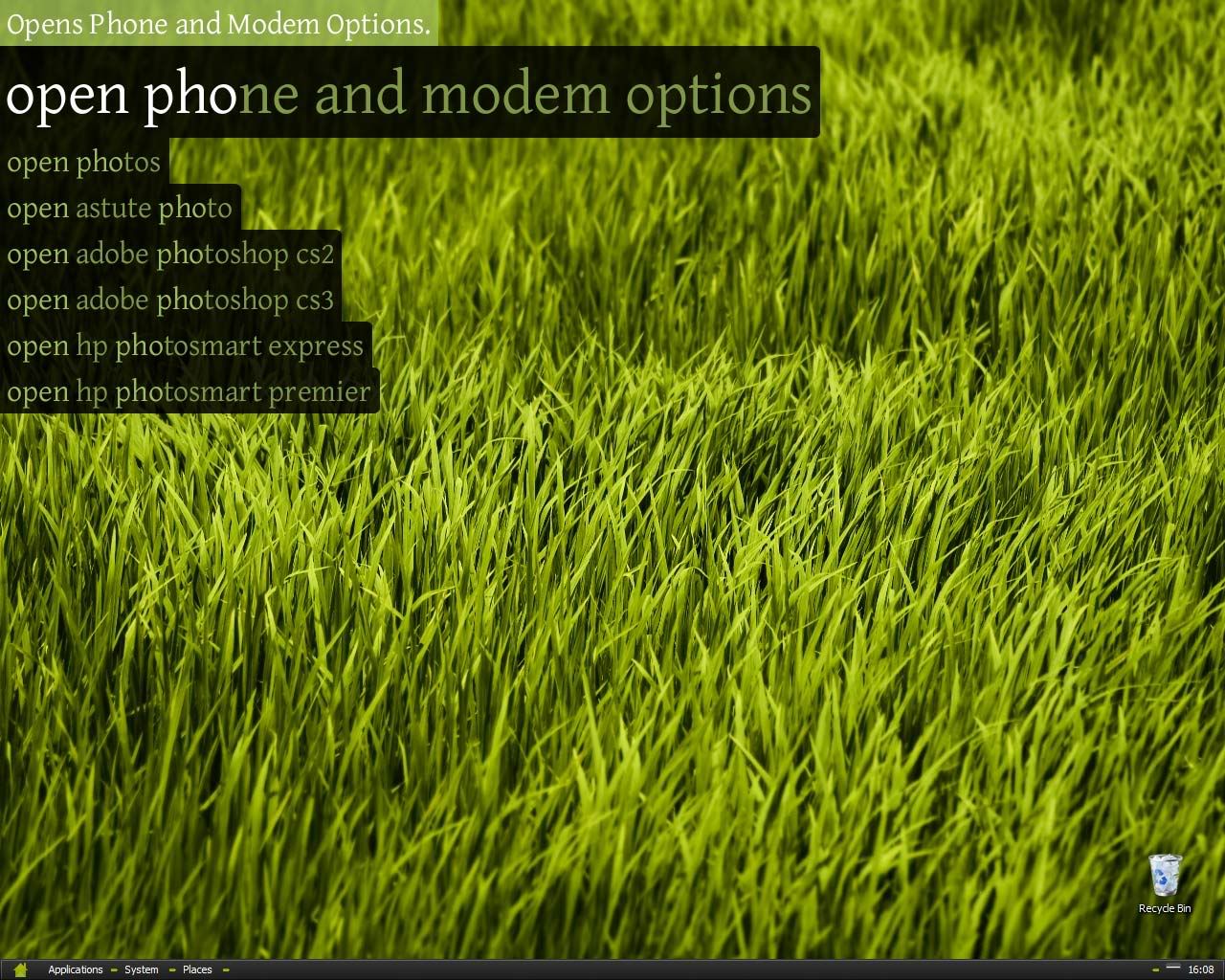
Image: Enso Launcher Enso is another launcher-styler application, similar in concept to countless others, including SkyLight, SlickRun, Launchy, and QuickSilver for the Mac.

While similar in concept, it's not similar in design nor execution. Humanized, the company responsible for creating Enso, is focused towards building what they call “humane” interfaces.

In fact, the interface of Enso isn't really an interface at all. It's a transparent layer of text on top of what you're currently doing. Unlike other such apps, this one is quasimodal. This means that it won't get in your way at all, it won't de-rail your train of thought - like regular dialog boxes.

Enso screenshot

The power of Enso is also not to be scoffed at. Besides being beautifully presented in the lovely Gentium typeface, there's some serious power here. You can use the “open”  command for nearly all your programs (e.g. “open notepad”). You can also teach Enso new commands using the powerful “learn as open” command. Simply highlight the item you want to open (a URL, a local address, or even a file).

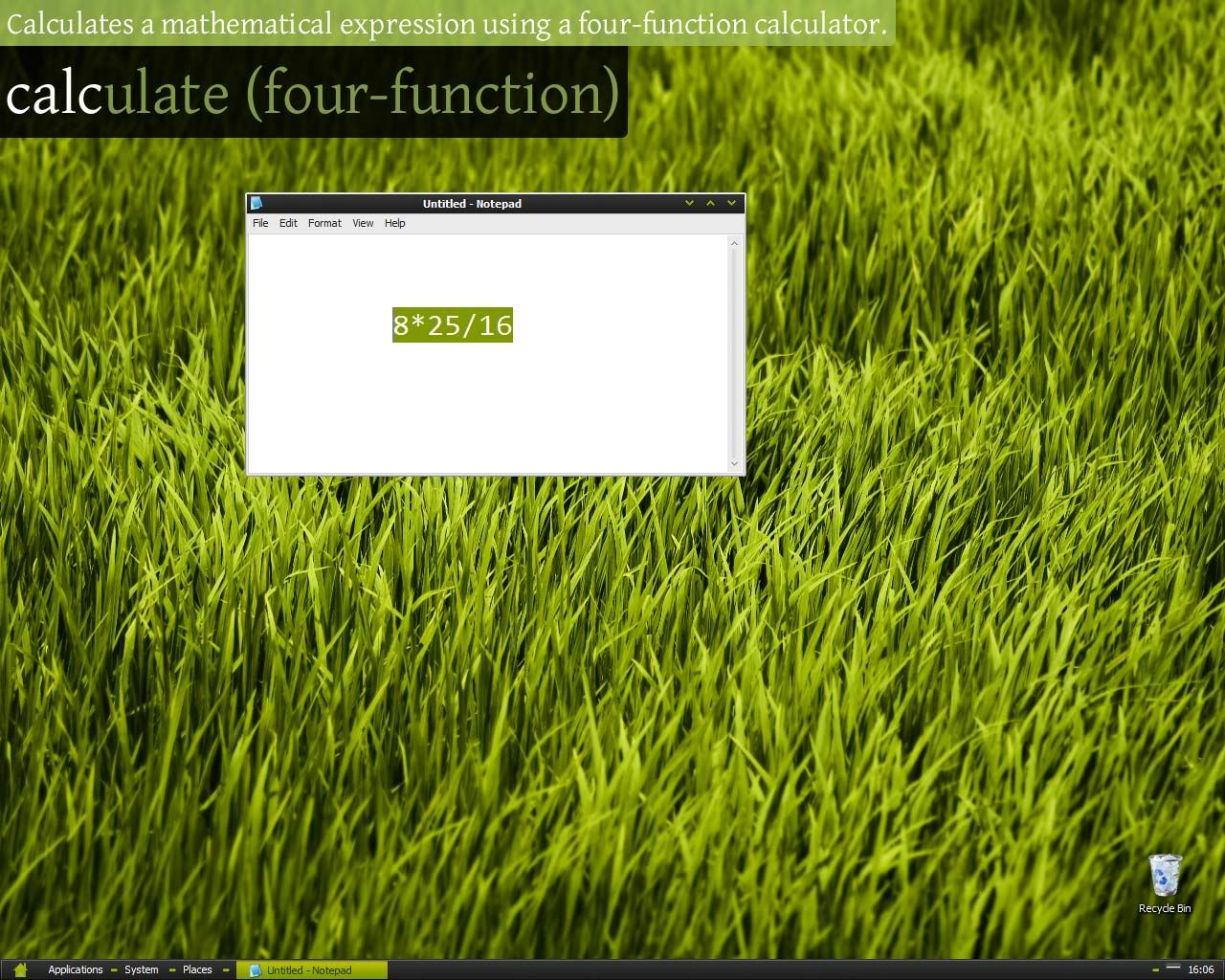
Other commands include “google search term” - a facility for a quick Google search. Enso also has pretty handy string-handling tools (“to upper case”, etc), and can even quickly calculate a sum.

I've also installed the Enso Words program, which works in tandem the launcher. It adds some more functionality, especially when handling text, such as a spell checker, and word/character counts.

Enso screenshot

Enso has really changed the way I compute. It's added a “humane” interface, and a fast, flexible way to work with my PC. It's also inspired me to build better programs, based on a more user-friendly interface.

I've used a lot of app launchers in the past, but after a few days I always felt like I was using it for the sake of using it. I felt like they were offering me no usability improvements at all after a while. Not so with Enso!

Further reading

  • Humanized - Enso homepage
  • Comparison of application launchers (Wikipedia)
  • Introduction to application software launchers
  • Continue Reading

    The Power of the Optical Mouse

    Image: The futuristic Starck MouseI'm continually frustrated by the trackpad on my Extensa laptop. It's not that it's a particularly bad trackpad, it's just frustrating.

    Trackpads don't help at all when it comes to precise mouse selection. If you've ever tried to use Photoshop on a laptop you'd know what I mean.

    Photo Credit

    The optical mouse is a great tool for the modern laptop user. The great thing about them is you can use them on virtually any flat surface to a reasonable degree. They even work on bedsheets.

    One thing about trackpads - dragging and dropping from one end of the screen to another is just so difficult to do. From a design perspective it's hard to make this any easier to do with a trackpad.

    You can do everything you want to with a trackpad, but it just takes so much longer and is so much less satisfying to use than a simple optical mouse.

    The mouse was designed to fit the palm and move a cursor in co-ordination with your hand. It wasn't intended to be a small, flat surface which only reacts to finger movement. Give use something substantial.

    The point: for all you laptop users who haven't yet bought an external mouse, buy one right away. You don't need me to tell you. It's obvious! Get it optical too. No trackball cleaning to do and much more versatile. I don't care about wireless but you might. Free yourself from the shackles of the 2"-wide miserable bit of plastic you call your mouse.

    Continue Reading

    Acer Extensa 5220 (and Vista)

    Brief Thoughts

    This is as much a short review on the notebook as well as a brief review of Microsoft's newest Operating System - Windows Vista.

    Part One - The outside

    The Acer Extensa 5220 is a mid-range notebook. With laptops, specs are everything - and the Extensa has some respectable figures.

    Design-wise it seems decent enough. The body is a mix of a couple of dark greys and black. The outer parts are charcoal grey, and more of the inner sections are darker. The keyboard is black and has no backlighting (bummer). The sides and bottom aren't particularly clean, but that's not to say they're cluttered either. There are a few chrome accents to spice it up but in reality it's nothing particularly inspiring.

    Physically, it weighs around 2.8kg, which I found to be quite lightweight. This is probably helped by the fact that it feels extremely balanced - I quite enjoy using it when it's sitting on my lap. It has a standard 1200x800 15.4" LCD. It uses what Acer call their CrystalBrite technology. I personally really enjoy using the screen, and Vista have their screen fonts slightly larger than XP's were for better readability.

    The keyboard has an ergonomic perpetual curve which is absolutely love. I got used to the layout in a day and am now typing fairly quickly on it. I find the trackpad to be quite good, especially since it has a scroll wheel on the side.

    Part Two - The specs

    The all-important specs. If a laptop fails here it simply won't sell.

    First off, let me explain that I bought this laptop for simple stuff: emailing, blogging, programming, etc. I wanted a portable workstation, simply an extension to my home computer. As such I didn't need great specs, but Windows Vista demands a minimum level of performance.

    It packs an Intel Celeron 1.86 GHz. It's quite good, even though all in all it's nothing special. To compensate for this I got a €60 upgrade to 2GB RAM. It originally had 1GB. I find the computer's multitasking to be more than adequate.

    It's got an 80GB hard-drive, which may be considered quite small, indeed I do find it quite limiting, but I plan to add an external USB HDD to compensate.

    Part Three - Windows Vista

    I was convinced that this was going to be my least favourite part of the computer. I knew Vista to be slow, clunky, and excessively security-oriented - making it extremely annoying to use. However I quickly set about downloading some programs to ease my experience. I highly recommend Tweak UAC.

    Very quickly, Vista grew on me. I'm now at the stage where I got used to the interface, and have come to appreciate some of the genuine improvements it offers over XP. I love the new shellstyle(?), and I also like the idea of putting all the networking options in one place. This tripped me up at first but now I prefer it. I managed to connect to the internet just 20 minutes after turning it on for the first time (time includes Vista installation).

    Since it's been out for quite a while, there were numerous security updates and other patches to be installed. It was all automated, with Vista installing around 49 updates in total, and I restarted around 4 times, however you could restart at your leisure so it wasn't a problem.

    Vista seems to have a bit better memory management than XP. When switching between apps, the machine didn't slowly churn into life; it was a fast and seamless process. I also love the new user log-in page, with the huge user icons.

    The eye candy has been kept at a respectable level, the transparency has been disabled (this is Vista Home Basic - no extra eye candy), however I did enable the Aero interface by a little hacking of the registry.

    Conclusion

    Well, I think that overall I'm extremely satisfied with the Acer Extensa 5220. Now that I've ironed out the workflow bumps and I've taken care of most of the "new computer" bloated pre-installed software, most of which turned out to be really good.

    It's a typical mid-range notebook that's not overly capable, and certainly doesn't disappoint. It's a laptop that feels well "sorted". This is supported the very good keyboard and trackpad, as well as the placement of certain elements to enhance usability - including speakers placed in the front, and heat vents in a logical position.

    All in all, it's fair to describe it as fairly average, but very useable. I'm certainly very happy with it, and it's not likely to annoy many people.

    Rating: Solid Recommendation

    Extra: Recommended Programs

    Below is a list of programs I recommend to use with Vista. All of them are free downloads. Click on the name to go to their download sites.

    Continue Reading

    It's been a while

    I'm more or less back! It's been a while since I last posted on here. It's also been a while since I've been out of the photography world. It's been over two and half months since I last took some “keepers”. This was probably due to the shock of what happened, but no, I haven't really been thinking about it so much. When something like that happens, it turns you off the subject for a while. A little like losing a spouse - it's gonna take a while till you get back in the game.

    The last photography-related post was a brief overview on the Sigma DP1, a compact camera equipped with a sensor as large as an APS-C SLR. Since then , it's gone on sale as originally promised and on time (surely a first for Sigma?).

    A lot more has happened in the digital photography world since my time-out. Eventually these will all get covered. However it's going to be difficult to maintain this as much as I used to, at least for the time being. I'm going through a vitally important time in my life and sadly, exams don't allow room for much free time.

    A possible change in scope

    If I had my way, I'll probably start writing about more topics than photography. I know it's the title of the blog, and in fact this will still remain heavily photographer-biased.

    However, probably because photographers spend a lot of time on a computer, the articles will still seemingly apply. I plan to add more computing-related articles. Many photographers dabble in things like web-design, and even computer programming.

    I know I said I was going to pick up an Eee PC, but recently I've changed my mind and have swallowed up my pride and ordered a laptop loaded with (!) Windows Vista on it. People who don't know me personally probably don't know of my extreme dislike for Microsoft's newest operating system. Suffice to say I'm not looking forward to working with it. So why buy it? Purely a matter of economics. I was offered a great deal on the laptop. It at least has some good specs to shoulder the burden of Vista's excessive eye-candy. More updates when it arrives.

    My thanks goes to those who have stuck by me through the loss of my data. I'm now back and have at least been more active on the photography front. Stay tuned, I'll announce my secret programming mini-website in the next blog post.

    Continue Reading

    Linux Nightmares!

    If you think it'll never happen to you... think again!

    1.  I had an interest in Ubuntu 7.10 Linux distro

    2.  I got the steps needed to install dual boot from internet.

    3.  My 160GB hard drive is partitioned into C:\ and D:\ of equal size.

    4.  I moved all my pictures (20-25GB) to the D drive because C was choking.

    5.  Everything seemed fine.

    6.  I booted into Linux using a Ubuntu Live CD.

    7.  I couldn't connect to the internet - I was getting an IP address of 0.0.0.0.0

    8.  ...Meaning if I wanted help with installing, I had to re-boot back into Windows every time.

    9.  I proceeded with the more permanent installer.

    10. I had to cancel it half-way because it was taking too long to import my user account settings which I didn't need and could opt out of.

    11. I re-booted back into Ubuntu, as this gives me a fresh install every time.

    12. I went through with the installer again. Once again I had to specify what partition to store it on.

    13. As usual I resized one of the partitions to accommodate the Ubuntu installations.

    14. I can't tell which was which in terms of logical partitions, as they're obscurely labelled as something like: "/mba/dev/media/"... or something like that.

    15. I just hoped I wasn't over-writing anything at this point.

    16. Ubuntu didn't behave as expected, and even though all the files seemed to have been installed, the hard disk it was installed on was now called "File System", not "disk-1" and needed no extra mounting. Maybe it was now recognised as the default boot disk?

    17. A lot of restarts and further unsuccessful attempts at a clean install later, I tried to go back to Windows to find out what the heck was happening.

    18. This was supposed to be a matter of removing the Live CD and waiting until Windows did its thing.

    19. I started to get worried when I saw a continuous blank screen. The only hints that the computer was actually doing something was the hum of the hard drives spinning.

    20. I grew increasingly worried that it might never come back into life. I started looking around for that Windows CD I got with the computer just in case I might have to re-install Windows.

    21. After a long, anxious wait, Windows seemed to be coming round. I saw the familiar "Windows XP - loading..." logo.

    22. I got another blank screen. I was even more worried.

    23. The machine somehow re-booted itself and was now loading all over again... Strange. Maybe it usual startup disk-checking (or whatever) detected something was up and so took some action?

    24. XP loaded up just fine this time round.

    25. I dived straight into My Computer to check on the state of the partitions.

    26. Partition D was missing!

    27. Went on the internet to find ways to get back that partition.

    28. I feared that Ubuntu had overwritten my folder of photos!!

    29. I booted back into Linux, and sure enough, "File System" had completely replaced my D drive.

    30. Panic! 2 years' worth of photos!

    31. Since I had used a regular cut and paste job to move the files, it may be a case of finding software to "undelete" the files.

    32. I found some free software fairly quickly, however every time I wanted to "undelete" the files, the program hesitated, saying I have to dump them in a separate hard drive to prevent over-writing.

    33. How the heck am I gonna get another hard drive at 2a.m?!

    34. Think... think... think...

    35. I had to get back that D partition, no matter what. Now.

    36. To get back the partition, all I had to do was go to Disk Management and "re-allocate" it.

    37. This involved formatting the partition too.

    38. Now I attempted to "undelete" the files, and send them to this partition.

    39. I started writing this log of events.

    40. After an anxious wait, the program said it had successfully undeleted everything.

    41. I went to check the integrity. First signs were good...

    42. Catastrophe!

    43. The files were completely botched up. Some were there, but most weren't.

    44. While it had recovered the files, with sizes and everything, it didn't seem to get them properly. Most were completely un-readable, corrupted files.

    45. Some were mixed up too (scanned documents in the middle of a wildlife shoot?).

    46. Whoa! Now I'm completely shaken up. I lost two years' worth of work, love, and joy.

    And so ends one of the saddest days of my life

    Continue Reading

    Sigma DP1 (gallery up at dpreview)

    Phil Askey over at dpreview.com has just posted a beta gallery of the new and upcoming Sigma DP1 (site)

    The new Sigma is the latest iteration in a series of cameras which tried (mostly unsuccessfully) to capture the hearts of "serious" photographers.

    There have been many notable attempts, including the memorable Sony R1, Canon Pro1, Sony V3, and a few more. Nearly none of them had any successors.

    Thoughts

    The Sigma had to make a very big compromise. Instead of attaching a slow zoom lens, they've gone and attached a (moderately slow) fixed prime lens, thus keeping the total size and weight extremely pocketable. This means that the DP1 will have NO optical zoom whatsoever. It comes equipped with a compact 28mm f/4 that seems to be extremely sharp.

    This is because of its sensor.... an APS-C sized sensor, which is around 5x larger than compact camera sensors. Sigma have stuffed a Foveon X3 sensor in it. This created the need for a larger lens. Having such a large sensor will invariably result in much greater image quality than regular compacts.

    Looking at the samples this seems to be a great camera! Images are nice and sharp, and noise is kept low. Those 4MP images look fantastic from corner to corner with little CA and distortion. They look like prime candidates for up-rezzing to much larger resolutions like 10MP or so (a signature of Foveon sensors).

    Colour is excellent, vibrant yet very natural. I'm a little put off by the greens, which seem a little strange, but maybe it's just me.

    I have never seen this kind of superb quality in a compact camera! I'm impressed on so many levels (Sony R1 fans: you can't call your camera "compact").

    Will it sell?

    Sigma have been very brave with this camera. They certainly didn't go for big numbers with this camera like virtually every other compact camera manufacturer.

    They're not selling a huge zoom range. They're selling a good quality 16.6mm (28mm equiv) lens capable of rivaling the best lenses out there.

    They're not selling a big pixel count. They're selling a sensor capable of outputting very sharp images, albeit low-res.

    They are selling image quality.

    Sigma have also done a great job on the design. It's all-black, with black buttons, knobs, etc. They've included a hot shoe and even a mini-control dial. Great for photographers! Unfortunately though, the general public isn't likely to see it that way, and will probably be more tempted by that cute pink 12MP Casio sitting next to it.


    So will it sell? I certainly hope so, but unfortunately I doubt it. It's drawback sales-wise is its lack of big numbers, making it harder to sell if you own a camera store. It will appeal to the niche of real photographers who want a compact when they can't lug around their bulky DSLR.

    That said, this so far seems to be a great, great compact and offers a very interesting alternative to the throngs of compacts out there. Judging by its output here, I would pick one up in a heartbeat!

    Coming in Spring 2008, apparently.

    Continue Reading