Tech, Tips, and Tutorials.
Reviews, News, and Rants.

Showing posts with label google chrome. Show all posts

Safari 4 beta arrives, is fast, but still not the fastest (review & screenshots)

Apple have made waves with a tentative update to Safari, their internet browser, pushing it up to Safari 4 beta.

Despite its beta label, the excitement surrounding it has been huge, with multiple blogs posting first-looks and reviews. Here’s my quick review and screenshot tour.

GUI / Appearance

First off, kudos to Apple for working hard to make it look a little more like a native Windows application. It has standard Windows-controls up top for minimise, close, etc. It now finally looks like it belongs on Microsoft’s OS.

Apple have made the decision to use standard Windows font rendering by default, meaning most users won’t be taken aback by Apple’s blurred font rendering (you can blur your fonts again by going to preferences).

Interface: Chrome-inspired, only sleeker

The interface itself reminds me a lot of Google Chrome.

Some parts are a complete ripoff – except that Safari has more visual polish and sleekness than Google’s browser.

Take a look at the new, top-mounted tabs (top is Chrome, bottom is Safari):

… and the similar side buttons:

… and the “Top Sites” page, borrowed from Chrome (and made pretty by Apple):
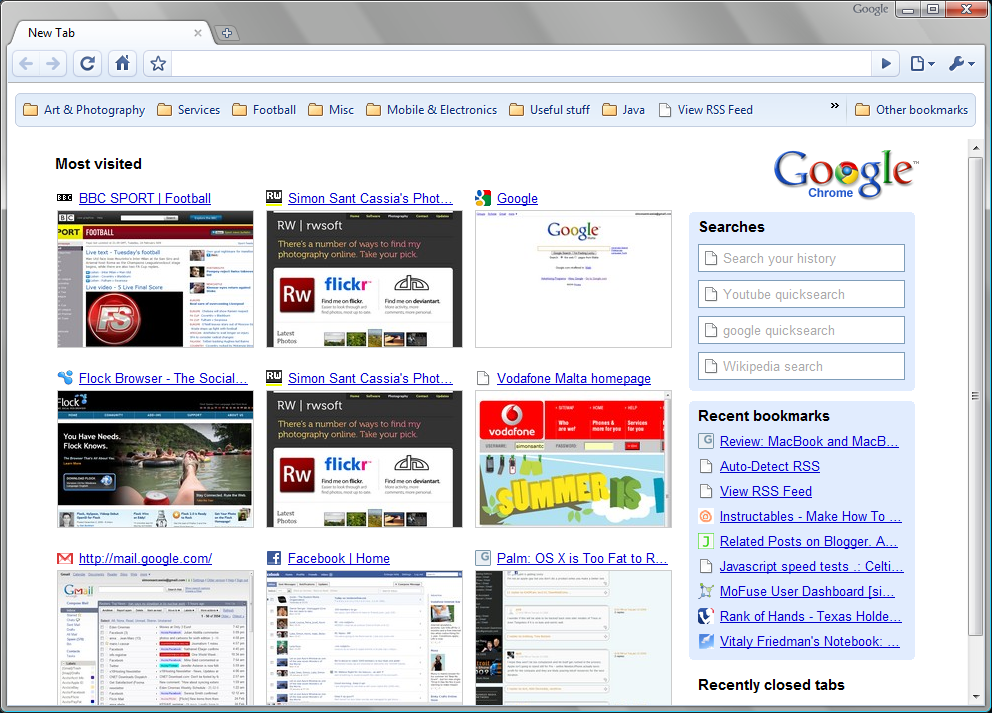
  vs. 
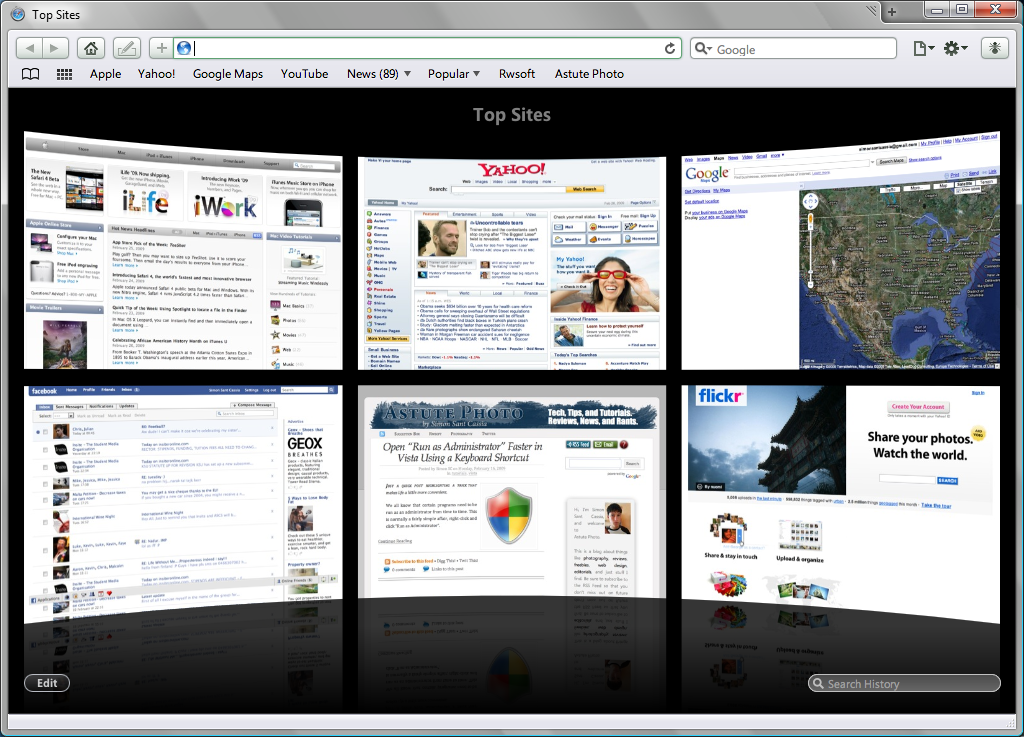
Tabs

The tabs are now top-mounted, just like in Chrome. Combining the title-bar and the tab-bar makes perfect sense, and makes great use of space.

The open tab is a little larger than the ones around it, and this helps give it prominence. Favicons aren’t shown in the tab/title bar and this is a little annoying.

Two things annoyed me. Tab reordering is controlled by these little grab-things on the sides of the tabs, which requires unnecessary mouse movement.

The other thing that annoyed me was that a middle-click doesn’t close tabs, it treats it like a normal click (i.e. switches to that tab). I’m too lazy to move my mouse to the close button, so fix it Apple!

Overall tab control is fine – not quite as good as Chrome’s, but much better than Firefox’s. Naturally you can tear them off to make new windows, just like in Safari 3.

Speed

  • Feels about as fast as Chrome at loading pages.
  • If it has a chance to cache the page first, it makes a huge difference.
  • Starts up very quickly, but still not as quickly as Chrome.
  • Firefox takes an age to start up after switching on, but it’s handicapped by me, since it has around 12 extensions running.

Overall it’s very, very snappy

But my testing (using timers and everything) shows it’s still not as fast as the current benchmark, Google Chrome.

Chrome bested its performance on every count, including: page load times, start up time,  memory handling, and others.

I wasn’t impressed by…

The bookmark/history coverflow. For how I work, it just isn’t useful. But more eye-candy is always nice.

The lack of an import bookmarks function. This was present in Safari 3 so I can’t imagine why Apple left it out. (I just didn’t see it, it’s under the File menu, accessible by pressing Alt).

The constant crashing. I saw a lot of this:

It’s pretty serious, as it happens every few seconds or so. Even though for some reason it doesn’t appear to do very much. The program rarely actually closes when you choose either of these two options.

The lack of an extensions platform. It’s been missing for a while and Safari isn’t the only offender.

But seriously, Firefox pretty much wrote the book on extensions, and it’s the deal-killer that means I will stick with the Fox for a while longer.

Continue Reading

Google Chrome ads on YouTube?

Adverts for Google’s web browser, Chrome, are surfacing on YouTube – the popular video-sharing service.

The adverts seen so far are appearing at the bottom of some videos, in the form of banners.

Surprising?

That fact that Google is using YouTube to advertise shouldn't come as a surprise. After all, Google does own YouTube.

What is really surprising is that they’re advertising something that isn’t yet out of beta mode – it hasn’t even reached version 1.0 yet! However, Google is known keep its products in perpetual beta mode.

Confidence by Google

One thing’s for sure. Using YouTube to advertise its new browser is a sign of confidence in its own product. Google seem to be placing huge faith in their web browser to deliver a better browsing experience.

Reaching out to average users

YouTube is a primary place to distribute ads, since it has enormous reach; and is typically visited by all sorts of users – including average, non tech-savvy users who typically stick to Internet Explorer.

Good for the industry

It has to be said, this can only be a good thing for the industry of web development. Google Chrome is highly regarded in terms of standards compliance and online security. Migrating users from the potentially more vulnerable Internet Explorer is always a good thing.

Continue Reading

Google Chrome gets an Update

Google Chrome, the newest web browser on the block has just received its first update.

There aren’t any technical details to be found about what the update brings. However on first impression it seems to be a bit more responsive. It’s also fixed the ‘:%’ crash which plagued the first public release.

If you entered colon sign followed by a percentage sign into the address bar, then Chrome used to instantly crash. Even hovering over a link containing the infamous ‘:%’ would cause it to crash. Thankfully the new build (Build 1798) fixes this issue.

There is still no fix, however, for the annoying trackpad-scroller problem. Basically, you can scroll down just fine, however it’s impossible to scroll up using the same method. This problem only exists on laptop trackpads – it works perfectly fine with a regular USB or PS/2 mouse.

How to Update Chrome

  1. Click the wrench icon (top right corner)
  2. Go to About Google Chrome.
  3. If your version is outdated, you should have an Update Now button next to the OK button. Click that to initiate the update.

No word on the Google Chrome blog yet about this update.

Note: An in-depth review of Google Chrome is coming up. I’m giving it a bit of time to sort out the kinks, growing pains, and fix a couple of known issues.

Continue Reading

Google enters browser wars with Google Chrome

As I write this, it’s just hit midnight over here and so today is the official release date of Google Chrome (it’s not, see update 2). Google Chrome is a new open source web browser.

Update: Chrome now available. See update 3.

Developed completely in-house, Google Chrome makes some pretty bold claims about being faster, better, and being built for the future.

They’ve also released an entertaining comic book to guide us through some of the amazing new features that Google Chrome is planning to offer:

  • A multi-threaded approach, similar to the way modern operating systems work. This will mean faster page loads.
  • Running each tab in a separate process, therefore it promises to be more memory efficient.
  • A task-manager for handling different tabs. This will enable you to see which tabs are using the most memory.
  • An advanced rendering engine, combining the best of both Firefox’s Gecko and Safari’s webkit technologies – regarded to be the best in the business of rendering web pages.
  • A completely redone JavaScript engine called V8, which promises blazingly fast JavaScript rendering. Firefox 3 is currently the fastest renderer, will Google Chrome beat it?
  • An intelligent URL bar, called the “Omnibox” – similar to Firefox 3’s awesome bar.
  • Each tab is sandboxed, meaning that a tab cannot by itself initiate commands and execute software. This is a nice improvement in security and should result in safer, more secure browsing.

There are a couple of features I haven't mentioned. I recommend you give the comic a good read through to find out about all the new features.

I’m personally very interested in this. As much as I love using Firefox and all its extensions and skins, it does get to be a memory hog at times. Plus I always appreciate faster page loads.

I’ll update when Google Chrome becomes available for public testing, which should be in a few hours. This software is at this point for Windows only.

Update: Google had posted screenshots at gears.google.com/chrome. However this was quickly taken down and now redirects to the Google homepage.
Update 2: Just read that the official release date is slated for the 3rd of September. It’ll also be released to just 100 countries worldwide. So not only do we have to wait for at another day, but it might not even be available here in Malta. Boo!
Update 3: GOOGLE CHROME NOW AVAILABLE FOR DOWNLOAD… and it’s everything I hoped for. Initial speed tests place it far above even Firefox and Safari.

Download at google.com/chrome

If that doesn’t work for you, I’ve set up a temporary mirror which you can download Chrome from. To download click here.

It imported all my Firefox bookmarks and settings seamlessly. It even placed the stuff in its own bookmarks toolbar just like the way I’m used to from Firefox. It also imported the home page, and all my saved passwords.

A full review is forthcoming.
Continue Reading